
Check out various maps below to view the Wisconsin Reroute.
Google map – Useful for navigating the reroute in the field on your phone
kml map file – For higher levels of data security, can upload this file into other map apps if you don’t use google maps.
PDF maps – Ready to print!
ArcGIS – View a detailed map of Wisconsin Line 5 in ArcGIS
Wisconsin Google Map
Embedded below is a Googlemap of the proposed Line 5 reroute in Wisconsin. You can explore the map here or CLICK HERE to view it on google maps.
If you practice higher levels of data security you can direct download the map data as a .kml file here (stored in Google Drive).
Instructions for mobile devices:
- Click the square in the top right corner which opens the map in the Google Maps app on your phone.
- This map also becomes added to your saved maps, and you will be able to find it quickly by opening the Google Maps app and clicking “saved” and then “maps”.
- We recommend downloading the map on your phone for offline viewing so that you can use it even without an internet connection or cell service:
- open the Google Maps app and click on your profile picture
- select “Offline maps”, then “Select your own map”
- adjust the map area to your desired location and tap “Download”– you can then navigate within the downloaded area even without an internet connection
KML Map file
For higher levels of data security, you can upload a .kml file into other map apps if you don’t use google maps.
Note: This is a .zip file. Once you download it, double click on it to convert it to a .kml file. From there, you can import the .kml file into your preferred map service.
PDF Maps
Adventure Map:
A large map placing the reroute in context. Includes political histories, camping sites, places of interest, facts about Line 5, Enbridge hot spots, and more. Included below are maps specifically designed for printing at different sizes, titles indicate paper size.
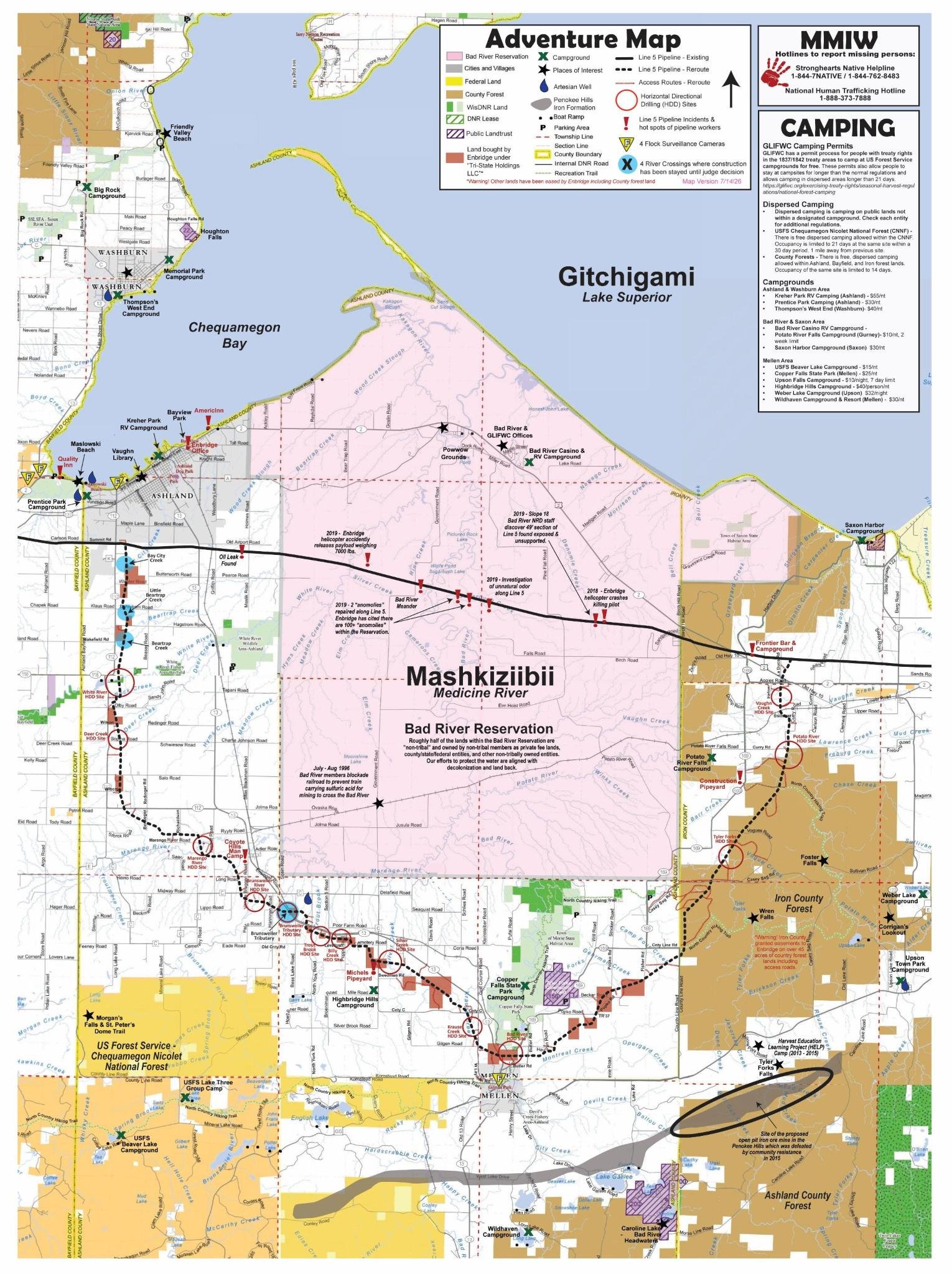
Adventure map, for social media and screen viewing
Adventure map versions for printing:
To assemble the pocket guide, print double sided on 2 sheets of paper, cut in half and then fold together.
Basic Terrain Map:
A basic map of the reroute with some topography and terrain. Download both the PDF maps below and print on two sheets of 11×13 paper at your local library .
ArcGIS Map
Construction Update Storymap
Link: https://uploads.knightlab.com/storymapjs/980734b3753b353960ed629639ec475c/july-updates/index.html